React Native UI Kit Sample App Reference implementation of React Native UI Kit and APNs Push Notification setup.
What this guide covers
CometChat Dashboard setup (enable push, add APNs provider).
Platform credentials (Apple entitlements).
Copying the sample notification stack and aligning IDs/provider IDs.
Native glue for iOS (capabilities + PushKit/CallKit for VoIP).
Token registration, navigation from pushes, testing, and troubleshooting.
What you need first
CometChat app credentials (App ID, Region, Auth Key) and Push Notifications enabled with an APNs provider (React Native iOS) ; add an APNs VoIP provider if you plan to receive call invites via PushKit.
Apple push setup: APNs .p8 key/cert in CometChat, iOS project with Push Notifications + Background Modes (Remote notifications) permissions.
React Native 0.81+, Node 18+, physical iOS device for reliable push/call testing.
How APNs + CometChat work together
APNs (iOS) is the transport: Apple issues the APNs token and delivers payloads to devices.CometChat provider holds your credentials: The APNs provider you add stores your .p8 key/cert.Registration flow: Request permission → APNs returns token → after CometChat.login, register with CometChatNotifications.registerPushToken(token, platform, providerId) using APNS_REACT_NATIVE_DEVICE → CometChat sends pushes to APNs on your behalf → the app handles taps/foreground events via PushNotificationIOS.
1. Enable push and add providers (CometChat Dashboard)
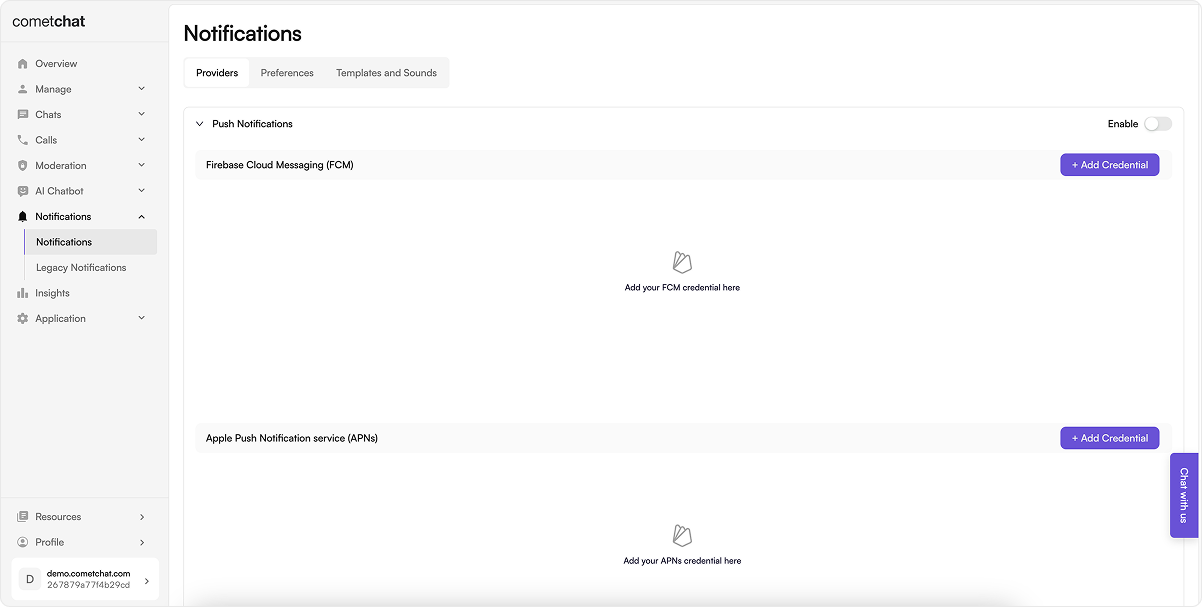
Go to Notifications → Settings and enable Push Notifications .
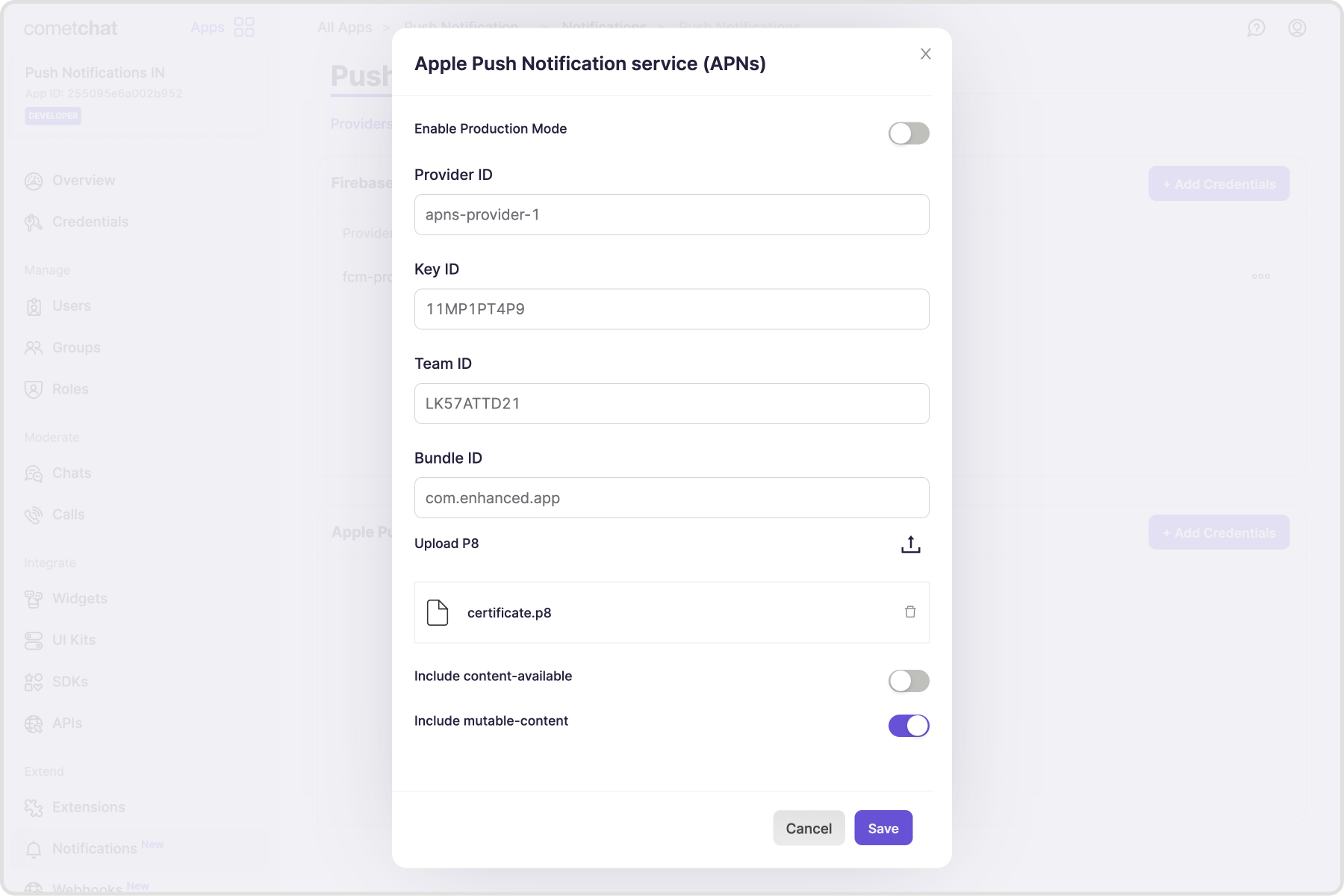
Add an APNs provider for iOS and copy the Provider ID.
Apple Developer portal For iOS we use Apple Push Notification service (APNs) for both standard and VoIP pushes. Follow these steps to create the credentials you’ll upload to CometChat.
Create a certificate signing request (CSR)
Open Keychain Access → Certificate Assistant → Request a Certificate From a Certificate Authority .
In Certificate Information , enter your Apple Developer email and a common name; choose Saved to disk , then Continue .
Save the CSR file locally—this contains your public/private key pair.
Create the APNs SSL certificate (.cer)
Sign in to the Apple Developer Member Center → Certificates, Identifiers & Profiles .
Click + to add a certificate.
Under Services , pick Apple Push Notification service SSL (Sandbox & Production) .
Select your App ID, upload the CSR, continue, and download the generated .cer file.
& &
Generate the APNs Auth Key (.p8)
In Certificates, IDs & Profiles , open Keys → click + .
Enter a key name, check Apple Push Notification service (APNs) , then Continue → Register .
Download the .p8 file and note the Key ID , Team ID , and your Bundle ID —you’ll enter these in CometChat.
(Optional) If you still use .p12, export it from the downloaded key without an export password; keep it handy for upload. Enable Push Notifications plus Background Modes → Remote notifications on the bundle ID.
3. Local configuration
Update src/utils/AppConstants.tsx with appId, authKey, region, and apnProviderId.
Keep app.json name consistent with your bundle ID / applicationId.
const APP_ID = "" ; const AUTH_KEY = "" ; const REGION = "" ; const DEMO_UID = "cometchat-uid-1" ;
3.1 Dependencies snapshot (from Sample App) Install these dependencies in your React Native app:
npm install \
    @cometchat/chat-sdk-react-native@4.0.18 \
    @cometchat/calls-sdk-react-native@4.4.0 \
    @cometchat/chat-uikit-react-native@5.2.6 \
    @notifee/react-native@9.1.8 \
    @react-native-async-storage/async-storage@2.2.0 \
    @react-native-community/push-notification-ios@1.12.0 \
    react-native-push-notification@8.1.1 \
    react-native-callkeep@4.3.16 \
    react-native-voip-push-notification@3.3.3
Match these or newer compatible versions in your app.
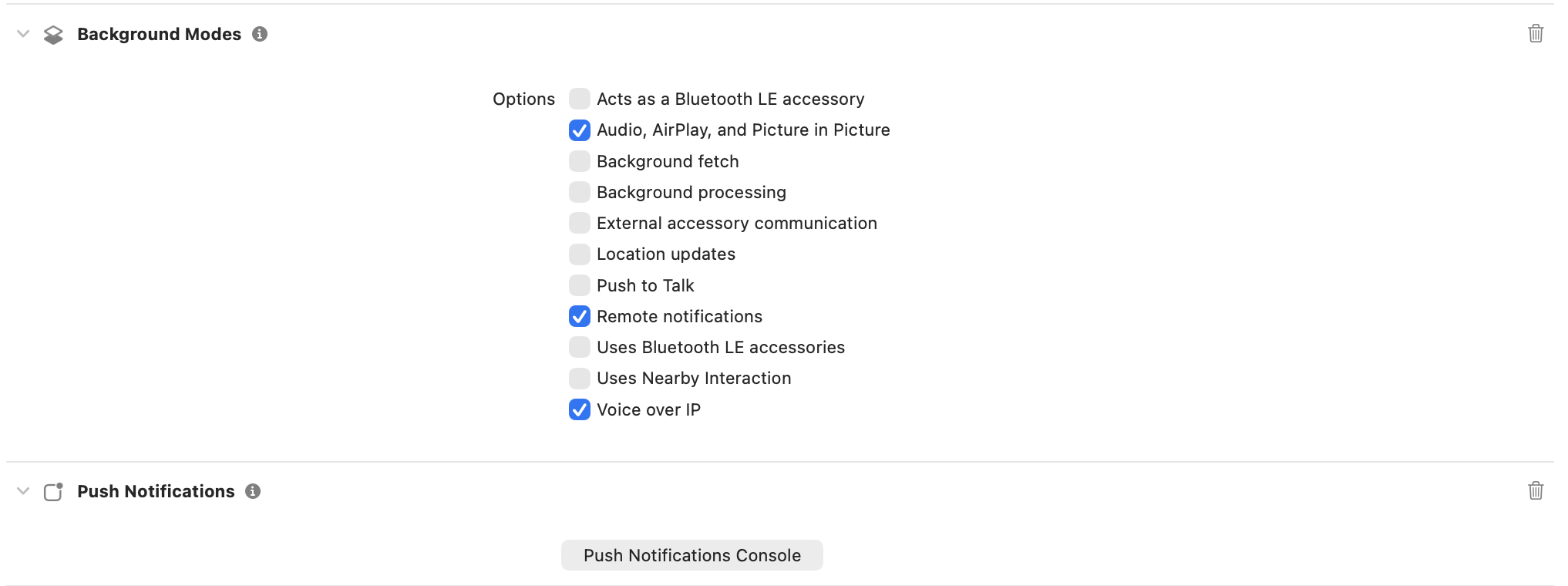
4. iOS App setup 4.1 Project Setup Enable Push Notifications and Background Modes (Remote notifications) in Xcode.
4.2 Install dependencies + pods After running the npm install above, install pods from the ios directory:
4.3 AppDelegate.swift modifications: Add imports at the top:
import UserNotifications import RNCPushNotificationIOS
Add UNUserNotificationCenterDelegate to the AppDelegate class declaration:
class AppDelegate : UIResponder , UIApplicationDelegate , UNUserNotificationCenterDelegate
Add the following inside the didFinishLaunchingWithOptions method:
UNUserNotificationCenter. current (). delegate = self UNUserNotificationCenter. current (). requestAuthorization ( options : [. alert , . badge , . sound ] ) { granted, error in if granted { DispatchQueue. main . async { application. registerForRemoteNotifications () } } else { print ( "Push Notification permission not granted: \( String ( describing : error) ) " ) } }
Add the following methods to handle push notification events:
func application ( _ application : UIApplication, didRegisterForRemoteNotificationsWithDeviceToken deviceToken : Data) { print ( "APNs device token received: \( deviceToken ) " ) RNCPushNotificationIOS. didRegisterForRemoteNotifications ( withDeviceToken : deviceToken) } func application ( _ application : UIApplication, didFailToRegisterForRemoteNotificationsWithError error : Error ) { print ( "APNs registration failed: \( error ) " ) RNCPushNotificationIOS. didFailToRegisterForRemoteNotificationsWithError (error) } func application ( _ application : UIApplication, didReceiveRemoteNotification userInfo : [ AnyHashable : Any ], fetchCompletionHandler completionHandler : @escaping (UIBackgroundFetchResult) -> Void ) { RNCPushNotificationIOS. didReceiveRemoteNotification (userInfo, fetchCompletionHandler : completionHandler) } func userNotificationCenter ( _ center : UNUserNotificationCenter, willPresent notification : UNNotification, withCompletionHandler completionHandler : @escaping (UNNotificationPresentationOptions) -> Void ) { completionHandler ([. banner , . sound , . badge ]) } func userNotificationCenter ( _ center : UNUserNotificationCenter, didReceive response : UNNotificationResponse, withCompletionHandler completionHandler : @escaping () -> Void ) { RNCPushNotificationIOS. didReceive (response) completionHandler () }
Add the following to Podfile to avoid framework linkage issues:
use_frameworks! :linkage => :static
You might have to remove below code if already present in your Podfile:
linkage = ENV [ 'USE_FRAMEWORKS' ] if linkage != nil Pod :: UI . puts "Configuring Pod with #{ linkage } ally linked Frameworks" . green use_frameworks! :linkage => linkage. to_sym end
Then lets install pods and open the workspace:
cd ios pod install open YourProjectName.xcworkspace
4.4 App.tsx modifications: Import CometChatNotifications and PushNotificationIOS:
import { CometChat , CometChatNotifications } from "@cometchat/chat-sdk-react-native" ; import PushNotificationIOS from "@react-native-community/push-notification-ios" ;
Get device token and store it in a ref:
Also, define your APNs provider ID from the CometChat Dashboard.
And request permissions on mount:
const APNS_PROVIDER_ID = 'YOUR_APNS_PROVIDER_ID' ; // from CometChat Dashboard const apnsTokenRef = useRef < string | null > ( null ); useEffect (() => { if ( Platform . OS !== 'ios' ) return ; const onRegister = ( deviceToken : string ) => { console . log ( ' APNs device token captured:' , deviceToken ); apnsTokenRef . current = deviceToken ; }; PushNotificationIOS . addEventListener ( 'register' , onRegister ); PushNotificationIOS . addEventListener ( 'registrationError' , error => { console . error ( ' APNs registration error:' , error ); }); // Trigger permission + native registration PushNotificationIOS . requestPermissions (). then ( p => console . log ( 'Push permissions:' , p ), ); return () => { PushNotificationIOS . removeEventListener ( 'register' ); PushNotificationIOS . removeEventListener ( 'registrationError' ); }; }, []);
After user login, register the APNs token:
// Register token ONLY if we already have it if ( apnsTokenRef . current ) { await CometChatNotifications . registerPushToken ( apnsTokenRef . current , CometChatNotifications . PushPlatforms . APNS_REACT_NATIVE_DEVICE , APNS_PROVIDER_ID ); console . log ( ' APNs token registered with CometChat' ); }
Prior to logout, unregister the APNs token:
await CometChatNotifications . unregisterPushToken ();
5. VoIP call notifications (iOS) These steps are iOS-only—copy/paste and fill your IDs.
5.1 Enable capabilities in Xcode
Target ➜ Signing & Capabilities: add Push Notifications .
Add Background Modes → enable Voice over IP and Remote notifications .
Run on a real device (PushKit/CallKit don’t work on the simulator).
5.2 AppDelegate.swift (PushKit + CallKit bridge) Update your AppDelegate to register for VoIP pushes ASAP and forward events to JS/CallKeep:
import PushKit import RNVoipPushNotification import RNCallKeep // ... @main class AppDelegate : UIResponder , UIApplicationDelegate , UNUserNotificationCenterDelegate , PKPushRegistryDelegate { // ... func application ( _ application : UIApplication, didFinishLaunchingWithOptions launchOptions : [UIApplication.LaunchOptionsKey: Any ] ? = nil ) -> Bool { // existing UNUserNotificationCenter code ... RNVoipPushNotificationManager. voipRegistration () // triggers PushKit token return true } // APNs device token handlers stay unchanged // PushKit token -> JS func pushRegistry ( _ registry : PKPushRegistry, didUpdate pushCredentials : PKPushCredentials, for type : PKPushType) { RNVoipPushNotificationManager. didUpdate (pushCredentials, forType : type. rawValue ) } // Incoming VoIP push -> CallKit + JS func pushRegistry ( _ registry : PKPushRegistry, didReceiveIncomingPushWith payload : PKPushPayload, for type : PKPushType, completion : @escaping () -> Void ) { let dict = payload. dictionaryPayload let uuid = (dict[ "uuid" ] as? String ) ?? UUID (). uuidString RNVoipPushNotificationManager. addCompletionHandler (uuid, completionHandler : completion) RNVoipPushNotificationManager. didReceiveIncomingPush ( with : payload, forType : type. rawValue ) RNCallKeep. reportNewIncomingCall (uuid, handle : (dict[ "handle" ] as? String ) ?? "Unknown" , handleType : "generic" , hasVideo : false , localizedCallerName : (dict[ "callerName" ] as? String ) ?? "Incoming Call" , supportsHolding : true , supportsDTMF : true , supportsGrouping : true , supportsUngrouping : true , fromPushKit : true , payload : nil ) } }
5.3 Drop in VoipNotificationHandler.ts Handles CallKeep UI, defers acceptance until login, and listens for PushKit events.
import { Platform } from "react-native" ; import notifee , { AndroidImportance } from "@notifee/react-native" ; import RNCallKeep , { IOptions } from "react-native-callkeep" ; import { CometChat } from "@cometchat/chat-sdk-react-native" ; import VoipPushNotification from "react-native-voip-push-notification" ; import { setPendingAnsweredCall } from "./PendingCallManager" ; const options : IOptions = { ios: { appName: "YourAppName" }, android: { alertTitle: "VOIP required" , alertDescription: "Allow phone account access" , cancelButton: "Cancel" , okButton: "OK" , imageName: "ic_notification" }, }; type IncomingPayload = { sessionId ?: string ; senderName ?: string ; callerName ?: string ; name ?: string ; type ?: string ; [ k : string ] : any ; }; class VoipNotificationHandler { channelId = "" ; isRinging = false ; isAnswered = false ; pendingAcceptance = false ; callerId = "" ; msg : IncomingPayload | null = null ; initialized = false ; private setupPromise : Promise < void > | null = null ; private listenersAttached = false ; private lastSessionId : string | null = null ; private lastRingAt = 0 ; async initialize () { if ( this . initialized && this . setupPromise ) { await this . setupPromise ; return ; } if ( ! this . setupPromise ) { this . setupPromise = ( async () => { if ( Platform . OS === "android" ) { await this . createNotificationChannel (); } await this . setupCallKeep (); this . setupEventListeners (); this . initialized = true ; })(). catch ( err => { this . setupPromise = null ; throw err ; }); } await this . setupPromise ; } private async setupCallKeep () { await RNCallKeep . setup ( options ); RNCallKeep . setAvailable ( true ); if ( Platform . OS === "android" ) { RNCallKeep . setReachable (); } } private async createNotificationChannel () { this . channelId = await notifee . createChannel ({ id: "message" , name: "Messages" , lights: true , vibration: true , importance: AndroidImportance . HIGH }); } async displayIncomingCall ( payload : IncomingPayload ) { this . msg = payload || {}; const sessionId = this . msg ?. sessionId ; const now = Date . now (); if ( sessionId && this . lastSessionId === sessionId && now - this . lastRingAt < 5000 ) return ; if ( this . isAnswered || this . pendingAcceptance ) return ; await this . initialize (); const callerName = this . msg ?. senderName || this . msg ?. callerName || this . msg ?. name || "Incoming Call" ; this . callerId = this . callerId || Math . random (). toString (); this . isRinging = true ; await RNCallKeep . displayIncomingCall ( this . callerId , callerName , callerName , "generic" , true ); this . lastSessionId = sessionId || null ; this . lastRingAt = now ; } onAnswerCall = async ({ callUUID } : { callUUID : string }) => { if ( this . isAnswered ) return ; this . isRinging = false ; this . isAnswered = true ; const sessionID = this . msg ?. sessionId ; if ( ! sessionID ) return ; RNCallKeep . backToForeground (); setTimeout ( async () => { const loggedInUser = await CometChat . getLoggedinUser (). catch (() => null ); if ( ! loggedInUser ) { this . pendingAcceptance = true ; await setPendingAnsweredCall ({ sessionId: sessionID , raw: this . msg , storedAt: Date . now () }); return ; } try { await CometChat . acceptCall ( sessionID ); } catch ( error : any ) { if ( error ?. code !== "ERR_CALL_USER_ALREADY_JOINED" ) throw error ; } RNCallKeep . endAllCalls (); this . pendingAcceptance = false ; }, 350 ); }; endCall = async ({ callUUID } : { callUUID : string }) => { const sessionID = this . msg ?. sessionId ; if ( sessionID ) { const loggedInUser = await CometChat . getLoggedinUser (). catch (() => null ); if ( this . isAnswered ) { await CometChat . endCall ( sessionID ). catch (() => {}); } else if ( loggedInUser ) { await CometChat . rejectCall ( sessionID , CometChat . CALL_STATUS . REJECTED ). catch (() => {}); } } const id = callUUID || this . callerId ; if ( id ) RNCallKeep . endCall ( id ); RNCallKeep . endAllCalls (); this . isRinging = false ; this . isAnswered = false ; this . pendingAcceptance = false ; this . callerId = "" ; this . msg = null ; this . lastSessionId = null ; this . lastRingAt = 0 ; }; setupEventListeners () { if ( this . listenersAttached ) return ; if ( Platform . OS === "ios" ) { VoipPushNotification . addEventListener ( "notification" , ( notification : any ) => this . displayIncomingCall ( notification )); VoipPushNotification . addEventListener ( "didLoadWithEvents" , ( events : any []) => { ( events || []). forEach ( event => { if ( event ?. name === VoipPushNotification . RNVoipPushRemoteNotificationReceivedEvent ) { this . displayIncomingCall ( event . data ); } }); }); } RNCallKeep . addEventListener ( "answerCall" , this . onAnswerCall ); RNCallKeep . addEventListener ( "endCall" , this . endCall ); RNCallKeep . addEventListener ( "didDisplayIncomingCall" , ({ callUUID }) => { if ( callUUID ) this . callerId = callUUID ; this . isRinging = true ; }); this . listenersAttached = true ; } } export const voipHandler = new VoipNotificationHandler ();
5.4 Add PendingCallManager.ts Stores an answered call during cold start so you can accept it after login/navigation is ready.
import AsyncStorage from "@react-native-async-storage/async-storage" ; export interface PendingAnsweredCallPayload { sessionId : string ; raw : any ; storedAt : number ; } let inMemoryPending : PendingAnsweredCallPayload | null = null ; const STORAGE_KEY = "pendingAnsweredCall" ; export async function setPendingAnsweredCall ( payload : PendingAnsweredCallPayload ) { inMemoryPending = payload ; try { await AsyncStorage . setItem ( STORAGE_KEY , JSON . stringify ( payload )); } catch {} } export async function consumePendingAnsweredCall () : Promise < PendingAnsweredCallPayload | null > { if ( inMemoryPending ) { const tmp = inMemoryPending ; inMemoryPending = null ; try { await AsyncStorage . removeItem ( STORAGE_KEY ); } catch {} return tmp ; } try { const raw = await AsyncStorage . getItem ( STORAGE_KEY ); if ( raw ) { await AsyncStorage . removeItem ( STORAGE_KEY ); return JSON . parse ( raw ); } } catch {} return null ; } export function isPendingStale ( p : PendingAnsweredCallPayload , maxAgeMs = 2 * 60 * 1000 ) { return Date . now () - p . storedAt > maxAgeMs ; }
5.5 Wire App.tsx for APNs + VoIP token registration and handler init import PushNotificationIOS from "@react-native-community/push-notification-ios" ; import VoipPushNotification from "react-native-voip-push-notification" ; import { voipHandler } from "./VoipNotificationHandler" ; import { consumePendingAnsweredCall , isPendingStale } from "./PendingCallManager" ; const APNS_PROVIDER_ID = "YOUR_APNS_PROVIDER_ID" ; // Capture APNs device token useEffect (() => { if ( Platform . OS !== "ios" ) return ; const onRegister = ( deviceToken : string ) => { apnsTokenRef . current = deviceToken ; }; PushNotificationIOS . addEventListener ( "register" , onRegister ); PushNotificationIOS . requestPermissions (); return () => PushNotificationIOS . removeEventListener ( "register" ); }, []); // Capture VoIP token useEffect (() => { if ( Platform . OS !== "ios" ) return ; const onVoipRegister = ( token : string ) => { CometChatNotifications . registerPushToken ( token , CometChatNotifications . PushPlatforms . APNS_REACT_NATIVE_VOIP , APNS_PROVIDER_ID ). catch ( err => console . log ( "[VoIP] register failed" , err )); }; VoipPushNotification . addEventListener ( "register" , onVoipRegister ); // token request is triggered in AppDelegate via RNVoipPushNotificationManager.voipRegistration() return () => VoipPushNotification . removeEventListener ( "register" ); }, []); // After login: register APNs token + init VoIP handler + consume pending accepts useEffect (() => { const run = async () => { if ( ! loggedIn || Platform . OS !== "ios" ) return ; const pending = await consumePendingAnsweredCall (); if ( pending && ! isPendingStale ( pending )) { await CometChat . acceptCall ( pending . sessionId ). catch ( console . log ); } const token = apnsTokenRef . current ; if ( token ) { await CometChatNotifications . registerPushToken ( token , CometChatNotifications . PushPlatforms . APNS_REACT_NATIVE_DEVICE , APNS_PROVIDER_ID ); } await voipHandler . initialize (); }; run (); }, [ loggedIn ]);
5.6 VoIP push payload (APNs / PushKit) Send a VoIP push with push_type=voip via APNs using a payload shaped like:
{ "aps" : { "alert" : { "title" : "Alice" , "body" : "Incoming call" }, "content-available" : 1 }, "sessionId" : "<COMETCHAT_SESSION_ID>" , "callerName" : "Alice" , "handle" : "alice" , "type" : "call" , "uuid" : "<UUID>" }
6. Handling notification taps and navigation To handle notification taps and navigate to the appropriate chat screen, you need to set up handlers for both foreground and background notifications.
7. Badge Count Implementation CometChat’s Enhanced Push Notification payload includes an unreadMessageCount field that represents the total number of unread messages across all conversations for the logged-in user. You can use this value to update the app icon badge, providing users with a visual indicator of unread messages.
7.1 Enable Unread Badge Count on the CometChat Dashboard
Navigate to Push Notification Preferences
Go to CometChat Dashboard → Notifications Engine → Settings → Preferences → Push Notification Preferences .
Enable the Toggle
Scroll down and enable the Unread Badge Count toggle.
Once enabled, CometChat automatically includes the unreadMessageCount field in every push payload sent to your app.
CometChat sends APNs payloads with the following structure:
{ "aps" : { "alert" : { "title" : "New Message" , "body" : "John: Hello!" }, "badge" : 5 , "sound" : "default" }, "unreadMessageCount" : "5" , "conversationId" : "user_abc123" }
The aps.badge field is set server-side by CometChat. iOS automatically updates the app icon badge when the push notification is delivered.
7.3 Handle Badge Count from Notifications Update your iOS notification handler to set the badge count programmatically:
import PushNotificationIOS from "@react-native-community/push-notification-ios" ; export async function onRemoteNotificationIOS ( notification : any ) { // Extract badge count from push payload const data = notification . getData (); const unreadCount = data ?. unreadMessageCount ; if ( unreadCount !== undefined && unreadCount !== null ) { const count = parseInt ( unreadCount , 10 ); if ( ! isNaN ( count ) && count >= 0 ) { PushNotificationIOS . setApplicationIconBadgeNumber ( count ); console . log ( "Badge count updated (iOS):" , count ); } } // Handle notification tap const isClicked = data ?. userInteraction === 1 ; if ( isClicked && data ?. type === "chat" ) { // Navigate to conversation... } // Required: Notify iOS that processing is complete notification . finish ( PushNotificationIOS . FetchResult . NoData ); }
7.4 Register Notification Listener In your App.tsx, set up the notification listener:
import PushNotificationIOS from "@react-native-community/push-notification-ios" ; useEffect (() => { if ( Platform . OS === "ios" ) { const onNotification = async ( notification : any ) => { try { await onRemoteNotificationIOS ( notification ); } catch ( error ) { console . log ( "Error in onRemoteNotificationIOS:" , error ); } }; PushNotificationIOS . addEventListener ( "notification" , onNotification ); return () => { PushNotificationIOS . removeEventListener ( "notification" ); }; } }, []);
7.5 Clear Badge When App Becomes Active Clear the badge count when the app launches or returns to the foreground:
import { AppState , AppStateStatus , Platform } from "react-native" ; import PushNotificationIOS from "@react-native-community/push-notification-ios" ; useEffect (() => { const handleAppStateChange = async ( nextState : AppStateStatus ) => { if ( nextState === "active" && Platform . OS === "ios" ) { PushNotificationIOS . setApplicationIconBadgeNumber ( 0 ); console . log ( "Badge cleared (iOS)" ); } }; const subscription = AppState . addEventListener ( "change" , handleAppStateChange ); return () => subscription . remove (); }, []);
7.6 Clear Badge on Logout When a user logs out, clear the badge so it doesn’t show a stale count on the login screen or for the next user:
import PushNotificationIOS from "@react-native-community/push-notification-ios" ; import { CometChat , CometChatNotifications } from "@cometchat/chat-sdk-react-native" ; const handleLogout = async () => { // Unregister push token first await CometChatNotifications . unregisterPushToken (); // Clear badge before logout PushNotificationIOS . setApplicationIconBadgeNumber ( 0 ); // Logout from CometChat await CometChat . logout (); console . log ( "User logged out, badge cleared" ); };
7.7 Clear Badge on Fresh Install / No Logged-In User On iOS, the badge count may persist after app uninstall and reinstall in certain scenarios. Clear the badge during app initialization when no user is logged in:
import PushNotificationIOS from "@react-native-community/push-notification-ios" ; import { CometChat } from "@cometchat/chat-sdk-react-native" ; // During app initialization, after CometChat.init() const initializeApp = async () => { // Initialize CometChat first await CometChatUIKit . init ( uiKitSettings ); // Check if user is logged in const loggedInUser = await CometChat . getLoggedinUser (); if ( ! loggedInUser ) { // No user logged in - clear any stale badge PushNotificationIOS . setApplicationIconBadgeNumber ( 0 ); console . log ( "No logged-in user, badge cleared" ); } };
7.8 Clear Badge in Login Listener (Safety Net) Register a login listener to clear the badge on logout as a backup mechanism:
import PushNotificationIOS from "@react-native-community/push-notification-ios" ; import { CometChat } from "@cometchat/chat-sdk-react-native" ; useEffect (() => { const listenerID = "BADGE_LOGOUT_LISTENER" ; CometChat . addLoginListener ( listenerID , new CometChat . LoginListener ({ logoutOnSuccess : () => { // Safety net: clear badge when logout succeeds PushNotificationIOS . setApplicationIconBadgeNumber ( 0 ); console . log ( "Logout listener: badge cleared" ); }, }) ); return () => { CometChat . removeLoginListener ( listenerID ); }; }, []);
7.9 Key Implementation Notes Consideration Details Backend-driven badge count The unreadMessageCount value comes directly from CometChat’s backend via the push payload, ensuring consistency across all devices. iOS server-side badge For iOS using APNs, the aps.badge field is set server-side by CometChat, so the badge updates automatically even without client-side code. However, you still need to clear it when the app opens. Clear on app active Always clear the badge when the app becomes active. New notifications will update the badge with the fresh unreadMessageCount from the backend. Clear on logout Always clear the badge when a user logs out to prevent stale counts for the next user. Clear on fresh install On iOS, the badge count may persist after app reinstall in certain scenarios. Clear the badge during app initialization when no user is logged in. Login listener safety net Use CometChat’s login listener as a backup to ensure badge is cleared on logout. Title enhancement Optionally display the unread count in the notification title (e.g., “John (5 unread)”) for additional visibility.
If you’re building a cross-platform app, use this combined handler for both iOS and Android:
import { AppState , AppStateStatus , Platform } from "react-native" ; import PushNotificationIOS from "@react-native-community/push-notification-ios" ; import notifee from "@notifee/react-native" ; useEffect (() => { const handleAppStateChange = async ( nextState : AppStateStatus ) => { if ( nextState === "active" ) { // Clear badge for iOS if ( Platform . OS === "ios" ) { PushNotificationIOS . setApplicationIconBadgeNumber ( 0 ); console . log ( "Badge cleared (iOS)" ); } // Clear all notifications for Android (also resets badge) else if ( Platform . OS === "android" ) { await notifee . cancelAllNotifications (); console . log ( "Notifications cleared (Android)" ); } } }; const subscription = AppState . addEventListener ( "change" , handleAppStateChange ); return () => subscription . remove (); }, []);
8. Testing Checklist
Install on a physical iOS device, log in, and verify APNs token registration succeeds.
Send a message from another user:
Foreground: Banner appears unless that chat is already open.Background/terminated: Tap opens the correct conversation; handler runs.
VoIP: Send a PushKit VoIP push (payload above); expect CallKit incoming UI; answer and confirm CometChat call connects; end clears the dialer.Rotate tokens (reinstall or revoke) and confirm onTokenRefresh re-registers the new token.
9. Troubleshooting Symptom Quick Checks No pushes Confirm APNs key uploaded, bundle ID matches, Push extension enabled with correct provider IDs, permissions granted. Token registration fails Ensure registration runs after login , provider IDs are set, and registerForRemoteNotifications() is called.